Showing posts with label Security. Show all posts

Monday, March 21, 2011

How to disable start up program and make your PC faster.

Many number of us install many softwares on our pc and many of them load at start up and make our pc slow.

Some advanced user know how to disable the unwanted softwares but newbies are still unaware so here is the tutorial to disable start to softwares,

Step 1. Open Run Command by going in the start menu and clicking run.


Step 2. In run command type "msconfig" without quotes and click Ok.

Step 3. A new window will open as shown in image. Select the Startup tab.
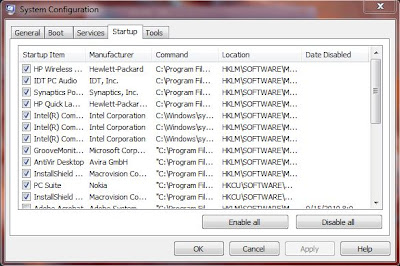
Step 4. In the startup you will number of programs that your pc load during startup.

Step5. Just deselect or unmark the program that you want to disable and select OK.
It will ask to restart just restart and your pc will be faster and more safer.

Any problem feel free to ask in comment section below.

Friday, February 25, 2011

New Opera 11.10 Barracuda Alpha Intros Speed Dial Evolution


The second Alpha development snapshot of Opera 11.10 codenamed Barracuda offers a glimpse of the evolution of Speed Dial, one of the trademark features of the browser.

Opera 11.10 Barracuda Alpha Build 2014 is now available for download to testers, and is intended to introduce what Opera Software calls just the first of additional modifications planned for Speed Dial in the Barracuda release.

Speed Dial simplifies common browsing tasks by easing access to a collection of sites that users tend to visit and revisit by placing a set of links on any new opened tab in Opera.

“Opera's Speed Dial was first introduced in an Opera 9.20 snapshot on Feb 28th 2007. The idea came about as we observed that people kept typing the same addresses for a few of their favourite websites again and again,” revealed Cezary Kułakowski, from the Opera Desktop team.

“Getting to their top web sites could mean hundreds or thousands of clicks on the keyboard in a single day. The solution we came up with was very simple, but very powerful. And today it's still one of the most loved, and copied, features in Opera.”

According to the Norway-based browser maker, codenamed Barracuda offers an excellent opportunity for Speed Dial to be kicked up a notch.

Kułakowski notes that with the advent of Opera 11.10, users will be able to take advantage of an evolved Speed Dial.

“We are going to make Speed Dial more fluid, dynamic and easier to use! What is included in this snapshot is the new flow layout. Please remember this is just a first peek at the changes we are making. Many very smart and innovative solutions are on the way,” he stated.

Since Opera packs a range of additional excellent features in addition to Speed Dial, the browser maker is also introducing changes designed to make them more discoverable.

“Don't worry; there won't be any pop-up bubbles or constant nagging. Instead we are going to have subtle animations and messages to remind you of features you can use in Opera,” Kułakowski promised.

Opera 11.10 codenamed Barracuda Alpha for Windows is available for download here.

Thursday, February 24, 2011

New Leaked Pictures Show 13-inch MacBook Pro and Specs


A new batch of MacBook Pro leaked images have surfaced, this time with their sources confirming the existence of a 13-inch model with the rumored ‘Thunderbolt’ (Light Peak technology), a 2.3 GHz dual-core Intel Core i5 processor with a 3MB shared level 3 cache, an optical drive and more.

Debated over at the MacRumors forums, the pictures seem to corroborate some recent claims that Apple’s new MacBook Pros have Light Peak technology built right into them through a “Thunderbolt” port.

What isn’t quite consistent with recent rumors is the list of technical specifications found on the system’s alleged box.

Early rumors said Apple would ship new MacBook Pros equipped with dual-storage solutions.

One would be SSD-based for the OS, the other HDD-based for the user’s files.

If these rumors are true, at least the 13-inch model appears to have a single 320GB hard disk drive spinning at 5400-rpm. Whether or not its bigger siblings are equipped with additional storage options remains to be seen.

The new laptop is said to ship with 4 GB of 1333 MHz DDR3 SDRAM as standard, and an Intel HD Graphics 3000 processor with 384MB SDRAM shared memory.

The screen has a 1280x800 resolution, and there’s a built-in “FaceTime HD” camera now, which should mark the end of iSight as we know it.

Going by the same list of hardware specs, Apple is holding on to the optical drive still.

The same 8x slot-loading SuperDrive that exists on current generation MacBooks is listed in the purported imagery of Apple’s new 13-inch MacBook Pro.

Finally, the Thunderbolt port supporting High-Speed I/O and Mini DisplayPort connections is mentioned.

Apple is expected to unveil the new systems soon. The company has confirmed a special event for next week, though the focus appears to be the iPad.

Google Apps Debuts a Certification Program


Google has been making strides in the enterprise market, but it's still a very small player. One way of growing the business is by having people 'on the ground,' so to speak, to promote and sell Google Apps to businesses which may not have heard of the suite or which don't have the personnel to make the switch.


That's the reasoning behind the Google Apps Authorized Resellers program. Now, Google is going one step further with the Google Apps Certification Program which enables specialists to earn an official certification from Google.

"As our partner community has more than doubled in the last year to over 2,500 partners in over 70 countries, partners have been seeking opportunities to demonstrate their expertise and competence to a growing customer base," Stephen Cho, Director, Google Apps Channels, wrote.

"We are therefore happy to announce the Google Apps Certification Program, which recognizes IT professionals for demonstrated abilities to sell, deploy, develop, and support Google Apps," he announced.

The resellers program is a great way of getting companies from around the world, which may not be inherently tech-oriented, to understand the benefits of Google Apps, by having sales representatives and experts available in the countries and cities where they operate.

The new certification program makes it easier for those companies to know which resellers they can trust the most and also helps the resellers differentiate themselves. For now, only one certification is available.

"Available today globally, is the first of these certifications, the Google Apps Certified Deployment Specialist, which certifies IT professionals who have demonstrated the fundamental knowledge and skills required to migrate to, configure, and deploy Google Apps," Cho explained.

The certification can be obtained completely online. The exam can be taken online as well and costs $100. It's only available in English for now, but Google plans to add support for other languages as well.

Tuesday, February 8, 2011

Google Chrome 9 Final Released


Google Chrome 9 has now been pushed to the stable channel, marking the official release of the latest version of the popular browser. After a slight delay during the winter holidays, the team is back on schedule, releasing a stable release every six weeks. With such a short release schedule, new versions are nothing major, but Chrome 9 comes with plenty of things to enjoy.

WebGL the upcoming web 3D graphics standard is now built in and enabled by default.

Also new is Chrome Instant, the browser implementation of the Google Chrome concept. Finally, the Web Store is now fully supported in the stable channel.

"Today, we’re excited to bring several new features from Chrome’s beta channel to the stable build, including WebGL, Chrome Instant, and the Chrome Web Store," Erik Kay and Aaron Boodman, Software Engineers at Google, announced.

WebGL went from idea to de facto standard in less than two years. The technology is supported by many major browser makers, Apple, Mozilla and, of course, Google.

It enables developers to leverage the GPU capabilities of most modern computers for immersive games or lavish website graphics inside the browser.

Chrome Instant implements the concept behind Google Instant in the browser. It's not enabled by default, but if activated it allows users to simply start typing in the Omnibox while the page they are looking for, the search results start loading in the background.

"The Chrome Web Store is now open to all Chrome users in the United States. As part of this, we’ve now added a link to the Chrome Web Store on the New Tab page, along with two sample apps. (If you don’t use these sample apps, they will automatically disappear after some time)," Google explained.

Google Chrome for Windows is available for download here.
Google Chrome for Linux is available for download here.
Google Chrome for Mac is available for download here.

Google Announces Gmail Priority Inbox for HTML5 Mobile Browsers


Users who feel overwhelmed by the amount of emails they get will be thrilled to find that Google has just announced Priority Inbox support for Gmail mobile. The new feature helps users save time by automatically identifying important incoming messages.

According to Google, Gmail uses multiple ways to prioritize incoming messages, including keeping track of the contacts the user emailed and chatted with the most, as well as which keywords appear most frequently in the messages users open.

Until now, Priority Inbox was only available on desktops and Android devices, but as of today it will be available for most mobile browsers that support HTML5, such as devices running iOS 3+.

Although, the feature may work well on mobile browsers such as Dolphin, which lacks HTML5 support for the moment, Priority Inbox may not be accessible on other mobile browsers with no HTML5 support.


Priority Inbox has several customization options that help users prioritize specific emails, which are accessible from the Settings link in the upper-right corner of the Gmail interface.

Users can make changes in any of the available sections: Default inbox, Priority Inbox sections, Filtered mail, Importance markers and Show Priority Inbox.

In addition, users are strongly advised to mark each email that has been mistakenly tagged as important or not important, by selecting the message in question, and clicking the “mark as important” or “mark as not important” button.

These buttons are easily recognizable as they have a plus or a minus icon and are placed just to the left of the Move to and Labels drop-down menus.

As soon as a message is marked as not important, it will be moved out of the “Important” section. Over time, the Priority Inbox feature will learn what’s important and incorporate user feedback into its algorithm.

Firefox 4.0 Beta 11 Available for Download [UPDATE]


Mozilla was considering making Firefox 4.0 Beta 11 available to testers either today or tomorrow at the latest, but it appears that the open source browser vendor finally decided to deliver the bits on February 8.

“QA has signed off on Firefox 4 beta 11. We intend to push it to mirrors tonight / tomorrow morning PST and release to the beta audience tomorrow, 2011-02-08,” revealed Christian Legnitto, Firefox release manager for Mozilla.

At the time of this article, Firefox 4.0 Beta 11 was not available for download, however, make sure to keep your eyes on this space and I’ll provide an update as soon as the Build goes live.

Mozilla only recently offered early adopters Firefox 4.0 Beta 10 for testing, and is now in the final stages of the development process.

According to the plans made public so far, Firefox 4.0 Beta 11 will be followed by Beta 12. Mozilla intends to ship a total of a dozen Beta releases for the next iteration of its open source browser, but at the same time, nothing is set in stone, and yet another Beta could follow, although chances of this actually happening are extremely slim.

“Firefox 4 beta 12 [has] no hard schedule. We're trying to get all betaN hardblockers done by this Friday, which would put us in position to build beta 12 at the start of next week.

“There are 17 betaN hardblockers with patches, which means there are only ~2 that don't have patches.

“We still reserve the right to have another beta if needed, but are driving to have beta 12 be the last. Again, highly dependent on remaining work, new items found during beta 11, etc.,” Legnitto added.

Firefox 4.0 Beta 11 for Windows is available for download here.

Firefox 4.0 Beta 11 for Linux is available for
download here.

Firefox 4.0 Beta 11 for Mac is available for
download here.

Sunday, February 6, 2011

Download Free Windows XP and Vista Releases to Test Websites Against Multiple IE Versions


Microsoft recently updated its free Windows XP and Windows Vista downloads making fresh releases available as a part of a continued effort (more than a couple of years now) to make it easier for website developers to test drive their projects against multiple versions of Internet Explorer.

Devs that create websites need to make sure that users will have the same experience when running different browsers, as well as when leveraging different flavors of IE for example.

Early adopters currently running Internet Explorer 9 are bond to have come across the emulation functionality that the browser offers, covering a number of older IE document modes, including IE8, IE7 and IE7.

Sometime however, emulations are not 100% accurate in depicting the user experiences associated with the actual browsers.

This is why Microsoft not only recommends, but also provides a variety of resources for developers to test their projects against IE versions still supported.

“One way to run multiple versions of Internet Explorer on one PC is to run the older version(s) of Internet Explorer using Windows XP Mode on a Windows PC running Windows 7 Professional, Enterprise, or Ultimate edition,” revealed Ted Johnson, Lead Program Manager, Internet Explorer.

Windows XP Mode is essentially a free copy of Windows XP SP3 that the software giant made available to Windows 7 customers requiring easy and cost free virtualization solutions for application incompatibility issues.

“Interested in trying this? This linked document provides detailed instructions for setting up a Windows XP Mode virtual machine and then copying it to create two additional XP Mode virtual machines and configuring them to run IE7 and IE8,” Johnson stated.

Of course, devs can also download the “Windows Virtual PC virtual machine hard drive images (VHDs) for testing websites with different Internet Explorer versions. These images were recently updated and now expire on May 18, 2011,” he added.

Windows 7 RTM Enterprise 90-Day Evaluation is available for download here.

The Internet Explorer Application Compatibility VPC Images are available for download here.

Thursday, January 13, 2011

First Patches For Windows 7


Early adopters running the latest release of Windows 7 Service Pack 1 will also need to deploy the first patches offered for Windows in 2011.

Specifically, testers will have to make sure that Microsoft Security Bulletin MS11-002 is installed as it is designed to patch a Critical vulnerability which also affects the Release Candidate (RC) of Windows 7 SP1.

Bulletin MS11-002 is set up to resolve two privately reported security holes in Microsoft Data Access Components. According to Microsoft, customers running the pre-release version of Windows 7 SP1 are also impacted by the patches.

Of course, it’s not uncommon for the software giant to release security updates for software that is still in development, especially if the patches are designed to resolve Critical issues.

“Windows 7 Service Pack 1 Beta and Windows Server 2008 R2 Service Pack 1 Beta are affected by the vulnerabilities described in this bulletin. Customers running these beta releases are encouraged to download and apply the update to their systems.

“Security updates are available from Microsoft Update and Windows Update. The security update is also available for download from the Microsoft Download Center,” the Redmond company.

ADO Record Memory Vulnerability - CVE-2011-0027 is the most severe out of the two security problems resolved by MS11-002.

The software giant confirmed that this is a remote code execution vulnerability, associated with Microsoft Data Access Components validation of memory allocation.

“This vulnerability could allow code execution if a user visited a specially crafted Web page. If a user is logged on with administrative user rights, an attacker who successfully exploited this vulnerability could take complete control of an affected system.

“An attacker could then install programs; view, change, or delete data; or create new accounts with full user rights. Users whose accounts are configured to have fewer user rights on the system could be less impacted than users who operate with administrative user rights,” Microsoft explained.

Windows 7 SP1 RC was released at the end of October 2010 and continues to be available for download to testers. The RTM version of the first upgrade to Windows 7 is expected by the end of March 2011.

Windows 7 Service Pack 1 (SP1) Release Candidate (RC) Build 7601.17105.100929-1730 and Windows Server 2008 R2 Service Pack 1 (SP1) Release Candidate (RC) Build 7601.17105.100929-1730 are available for download here.

Monday, January 3, 2011

BEWARE: If you are a facebook User then your privacy is at Risk


Old Apps Can Pose Privacy Risks for Facebook Users and Their Friends


People who own a Facebook account since before April should remove older apps and install new versions, because they still have unrestricted access to a wealth of information about them and their friends.

Back in April, Facebook announced a new data control system where users would be notified at install of how an application needs to interact with their account and information in order to work properly.

This allows people to weigh in the privacy versus functionality trade-off of certain apps and was part of the company's work with the Canadian Privacy Commissioner.

The new permissions dialog became mandatory starting June 1, 2010, but it didn't affect the access granted to already installed apps.

While Facebook was clear about this aspect with developers, it failed to include it in their announcement to users.

"Nothing will change for your existing users; you will retain the same level of data access you had before. For new users who see the new permissions dialog once you enable it, you will have access to all the data you request," the company told developers at the time.

Vanessa Dennis of PBS NewsHour points out that not only do older apps retain extensive access to data they don't actually need, but they also don't update themselves to newer versions that follow the improved data sharing model.

For example, the old YouTube App has access to a user's basic information (name, profile picture, gender, friends list, etc.), their profile information (likes, music, tv, movies, activities and so on), their contact information, details about their family and relationships, their photos and videos, posts in their news feed, as well as their friends' information. In addition, it can also post on their wall.

By comparison, the latest version of the YouTube App only needs access to basic information, news feed, to post on walls and to access the data at any time.

People can check and remove their old apps by going to Account > Privacy Settings > Apps and Websites. Clicking on any apps listed there will detail their level of access. The listing also provides a helpful indication of how old an app is.

Sunday, November 21, 2010

Impact of China's Internet Traffic Hijacking Largely Overstated

A security researcher claims that reports of China hijacking 15% of Internet traffic for fifteen minutes earlier this year are grossly overestimated, the real impact being closer to 0.015%.

On April 8, 2010, China Telecom, the largest ISP in China, announced bogus Internet routes to the rest of the world, which caused a portion of international traffic to be redirected through its nodes.


In technical terms this is called a BGP (Border Gateway Protocol) prefix hijack and it seems that the problem originated with a smaller Chinese carrier.

The incident saw limited coverage in the specialized media at the time, but it didn't make it into the more mainstream press.

The discussion resurfaced because of a report on Chinese trade recently released by the U.S.-China Economic and Security Review Commission.

On page 244 of the 324-page document, the commission writes that "For a brief period in April 2010, a state-owned Chinese telecommunications firm 'hijacked' massive volumes of Internet traffic."

Massive is a relative term, but the media is now circulating a more exact figure of 15%, which, apparently, was first put forth by Dmitri Alperovitch, vice president of threat research at security giant McAfee.

"Now certainly, diverting 15% of the Internet even for just 15 minutes would be a major event," says Craig Labovitz, chief scientist at Arbor Networks, a company specializing in network security and DDoS mitigation solutions.

"But as earlier analysis by Internet researchers suggested, this hijack had limited impact on the Internet routing infrastructure — most of the Internet ignored the hijack for various technical reasons," he adds.

In fact, based on data gathered from Arbor Network's worldwide sensors and discussions about the incident on the North American Network Operator Group (NANOG) mailing list, the researcher estimates that diverted traffic amounted to only a few Gbps.

"In an Internet quickly approaching 80-100 Tbps, 1-3 Gbps of traffic is far from 15% (it is much closer to 0.015%)," Labovitz concludes, suggesting that the 15% might actually be the percentage of affected routes in relation to a default-free table.

However, routes are not traffic and, in addition, all evidence up to this point suggests that the incident was most likely accidental.


Twitter Delicious Facebook Digg Stumbleupon Favorites More